

Best WordPress Auction Themes for Building an Auction Website
 Nitesh Singh
October 13, 2026

- Does a WordPress theme run your auctions?
- What should you look for in a WordPress auction theme?
- What are the best WordPress themes for an auction website?
- Can you use a free theme for an auction site?
- Does your theme choice affect auction page speed?
- How do you install a theme alongside an auction plugin?
A WordPress theme doesn’t run your bidding, your auction plugin does that. But the theme you pick decides how fast your pages load and how clean your listings look to a bidder scrolling on their phone. This guide is for anyone setting up an auction website on WordPress for the first time, whether you’re selling cars, collectibles, or running liquidation auctions. You’ll get a short list of themes that actually work well alongside an auction plugin, and what to check before you commit to one.
Quick answer: A theme controls layout, speed and design. Your auction plugin, such as Ultimate Auction Pro, controls the bidding itself: timers, proxy bids, and reserve prices. The three things that matter most in a theme are fast load speed, full WooCommerce support, and a clean listing grid, since most auction plugins build directly on top of WooCommerce.
Does a WordPress theme run your auctions?
No. The plugin handles bidding, timers and payments. The theme only controls layout and design.
It helps to separate the two clearly, because people mix them up constantly when they’re shopping for a “best auction theme.” A theme decides what your site looks like: colors, fonts, how your header sits, how your product grid lays out on the page. That’s it. Swap themes and your site gets a new coat of paint, nothing more.
Everything that actually makes an auction work lives in the plugin. Ultimate Auction Pro runs the bidding engine, the countdown timer, proxy bidding, reserve price checks, and payment collection once a listing closes. None of that depends on which theme sits underneath it. The same bidding, timer and pricing logic would run identically regardless of which theme sits underneath it, only the layout and styling around it would change.
This matters because it changes how you shop. Don’t look for a theme that claims to “support auctions.” Look for a theme that’s fast, clean, and plays well with WooCommerce, since that’s what your plugin is built on. Then let the plugin do the actual auction work.
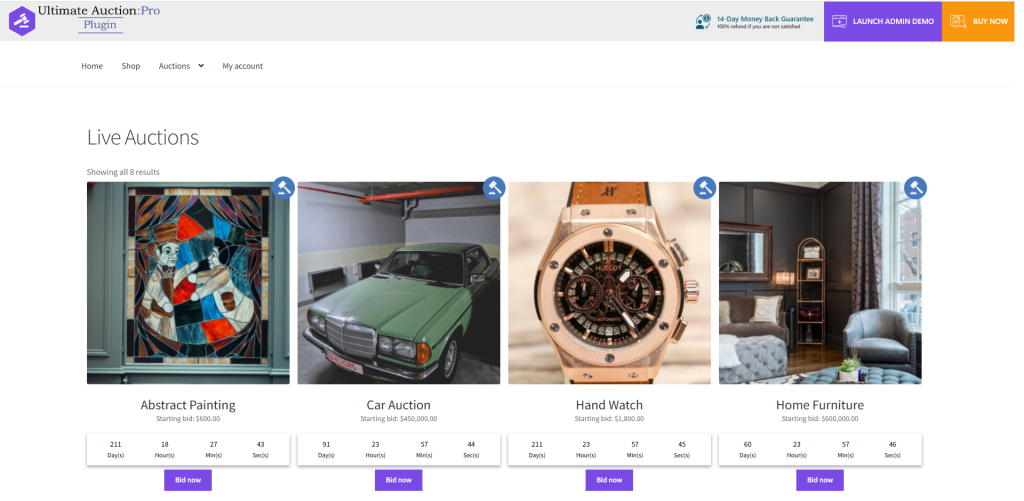
What should you look for in a WordPress auction theme?
Speed, full WooCommerce support, and a clean listing grid. Those three things matter more here than they do for a regular online store.
Speed matters most because auction traffic isn’t steady. Most sites get quiet browsing most of the day, then a spike of activity in the last few minutes before a listing closes, when everyone who’s watching logs in at once to place a final bid. A theme loaded with heavy sliders, unused builder scripts, or bloated animations can slow down right when it matters most. A lean, fast theme handles that spike without choking.
WooCommerce support isn’t optional, it’s the foundation. Auction plugins, including Ultimate Auction Pro, build their listings, cart and checkout flow on top of WooCommerce’s product structure. A theme that wasn’t built with WooCommerce in mind will fight the plugin on page layout, product image sizing, and checkout styling. Stick to themes that explicitly list WooCommerce compatibility, not ones that just “work with most plugins.”
Mobile responsiveness rounds it out. A lot of bidders place their final bid from a phone, often standing somewhere with a weak connection, watching the clock run out. If your listing page doesn’t resize cleanly, buttons get hard to tap and bids get missed. Test any theme you’re considering on an actual phone, not just by shrinking your browser window.
What are the best WordPress themes for an auction website?
There’s no single best theme, there’s a best theme for your situation. Here are the ones worth starting with, picked for different needs.
All four themes below are confirmed to work with Ultimate Auction Pro, since the plugin is built to run on any WooCommerce-compatible WordPress theme.
Astra is the safest starting point for most auction sites…
Astra is the safest starting point for most auction sites. It’s lightweight, loads fast out of the box, and has deep WooCommerce integration built in. The free version covers most of what a small auction site needs, and the Pro tier adds more layout control if you want a custom header or footer.
OceanWP suits sellers who want more built-in customization without touching code. It ships with WooCommerce-specific settings for product pages, including layout options for things like image galleries, which matters if your listings rely on multiple photos per item. It’s free to start, with a paid add-on bundle for extra features.
Flatsome fits larger or more visual auction catalogs, car auctions especially, since it’s built around a drag-and-drop page builder (UX Builder) and strong product-grid layouts. It’s a premium-only theme, so there’s an upfront cost, but it’s one of the most WooCommerce-native themes on the market.
GeneratePress is the pick for anyone who wants maximum speed and minimum bloat. It strips out everything decorative and leaves a fast, barebones foundation you style yourself. It suits sellers comfortable customizing CSS or working with a developer, less so anyone wanting a theme that looks finished on install.
Your Theme Sets the Look. Your Plugin Runs the Bidding.
Pair any WooCommerce theme with Ultimate Auction Pro for proxy bids, countdown timers, reserve prices, and automatic payment collection.

Can you use a free theme for an auction site?
Yes, for a basic setup. But free themes tend to cap out fast once you need more customization or reliable support.
Free themes usually give you enough to launch: a working layout, WooCommerce support in the popular ones, and basic customizer options for colors and fonts. What they typically skip is the deeper stuff, premium block patterns, priority support when something breaks, and faster update cycles when WordPress or WooCommerce pushes a core change that breaks compatibility.
Free is genuinely fine for a small hobby auction, a one-off charity sale, or a site you’re testing before committing to a paid plan. It stops being fine once you’re running frequent high-value auctions, where a broken checkout or a slow page during closing time costs you real money, not just inconvenience. At that point, the cost of a premium theme is small compared to what a failed auction closing could cost you.
Does your theme choice affect auction page speed?
Yes, more than it would for most other site types. Auctions depend on real-time bidding, so a slow theme doesn’t just annoy visitors, it can cost someone a win.
Think about what happens in the final minute of a close listing. Everyone watching that item logs in at once, refreshes the page, checks the current bid, and places their own. If your theme is dragging in heavy sliders, unused page-builder scripts, or animation libraries nobody asked for, every one of those page loads takes longer. A bidder who refreshes and waits two extra seconds for the current price to show up might place a bid a beat too late, or just give up and move to the next listing. That’s lost revenue sitting in a bloated theme file.
A lean theme strips that out. It loads the listing page, the bid form, and the countdown timer fast, without extra scripts fighting for the same resources your auction plugin needs to update bids in real time. This is the same reasoning behind the mobile-speed point in what to look for in an auction theme: speed isn’t a nice-to-have here, it’s part of whether the auction actually works the way it’s supposed to.
How do you install a theme alongside an auction plugin?
Install the theme first, then WooCommerce, then your auction plugin, then test a real listing before you launch. The order matters more than people expect.

Here’s why. Your theme sets up the basic page structure first. WooCommerce then adds the product, cart and checkout framework your theme needs to recognize. Your auction plugin, such as Ultimate Auction Pro, builds its bidding features on top of that WooCommerce structure, which is also why a WooCommerce-compatible theme isn’t optional, it’s load-bearing. Installing out of order usually still works, but you’re more likely to hit a template conflict that’s a pain to track down later.
The conflict to actually watch for is page builders. Themes that ship with their own builder (Elementor, Divi, UX Builder, whatever it is) sometimes override the templates your auction plugin uses to display the bid box, countdown timer or current price. If a listing page looks broken after install, a builder-overridden template is usually the first thing to check, before assuming the plugin itself is at fault.
Once everything’s installed, create one test listing and run it start to finish: place a bid from a second account, let the timer hit zero, and confirm the winner notification and checkout page both work. That one test catches most install issues before a real bidder ever sees them.
For the full install sequence, see the installation guide.
Your next step
Pick one theme from the shortlist above, install it on a staging site, and run a full test auction before you touch your live site. Set up a listing, bid against yourself from a second account, and let the timer run to zero. If the bid box, countdown and checkout all work cleanly, you’re ready to launch. If something looks off, it’s almost always a page-builder conflict, not the plugin itself.
If you’re still weighing which plugin to build your auction site around, see how Ultimate Auction Pro handles bidding, proxy bids and reserve prices, then pick a theme from this list to pair with it.


Nitesh Singh is a software veteran and the Founder of Ultimate Auction. With 16+ years of experience in web development, he specializes in building high-performance auction tools for the WordPress community. Connect with Nitesh on LinkedIn or follow his latest auction strategy guides here.
More articles by Nitesh SinghRelated Post

How Much Do Estate Auctioneers Charge
Estate auctioneers typically charge 15-35% commission on what your items sell for. But the actual cost depends on what’s included, where you are, and what you’re selling. Understanding these fees upfront helps you compare auctioneers fairly and know what you’ll actually take home. How Much Will You Actually Pay? Estate auctioneers charge in several ways. […]
Read More
What Is a Buyer’s Premium? (Auctions, Real Estate, and Why It Exists)
A buyer’s premium is an extra fee, usually a percentage of your winning bid, that the auction house charges you on top of the hammer price. It catches people out constantly, because the number the auctioneer shouts is not the number you actually pay. Win a car at $10,000 and your bill might be $11,500 […]
Read More
15 Must-Have Features in Auction Software (Checklist)
Picking auction software gets easier once you know which 15 features matter and which ones just pad a pricing page. This checklist is for auction house owners, ecommerce teams, and startups choosing a platform. It covers everything from real-time bidding to fraud protection. After reviewing auction platforms, here’s what separated the good ones from the […]
Read More