

How to Liquidate Inventory Through Online Auctions
 Nitesh Singh
April 18, 2025
Nitesh Singh
April 18, 2025





- What does it mean to liquidate inventory?
- How does a liquidation auction work?
- What are the ways to liquidate inventory online?
- How do you liquidate Amazon inventory?
- Where does liquidation stock come from, and who buys it?
- Which method should you choose?
- How can auction software help you liquidate stock?
- What should you do next?
Liquidating inventory means selling excess or slow-moving stock quickly, usually at a discount, so you turn it back into cash and free up space. The main routes are online auctions, wholesale or liquidation buyers, e-commerce marketplaces, and Amazon’s removal programs. This guide explains each one, walks through how an online liquidation auction works step by step, and helps you choose the method that fits your stock. [PLACEHOLDER: one line of first-hand experience, e.g. what a customer liquidated with Ultimate Auction and how long it took.]
What does it mean to liquidate inventory?
To liquidate inventory is to sell stock that isn’t moving, usually at a discount, so you recover cash instead of paying to store it. It covers overstock, seasonal leftovers, discontinued lines, customer returns, and goods nearing their expiry date. The aim is recovery, not margin.
Holding unsold stock costs money every month: warehouse space, insurance, handling, and cash that could be buying products that sell. At some point, selling at a loss costs less than keeping it. [PLACEHOLDER: add a real example or a sourced figure for holding costs.]
Signs it’s time to liquidate:
- Demand has dropped, or the season has ended
- The product is discontinued or close to its expiry date
- You need the space or the cash for faster-moving lines
Large retailers do this routinely. Surplus and returned goods are commonly sold in bulk lots to liquidators and resellers, who then resell them at a mark-up. That’s why buyers for pallets and mixed lots already exist, and why an auction can attract them.
The online auction market overall is forecast to grow by about USD 3.98 billion between 2025 and 2029, according to a Technavio report, so more buyers are comfortable bidding online. [VERIFY this figure on Technavio's page before publishing, and keep the wording "online auction market", not "liquidation".]
How does a liquidation auction work?
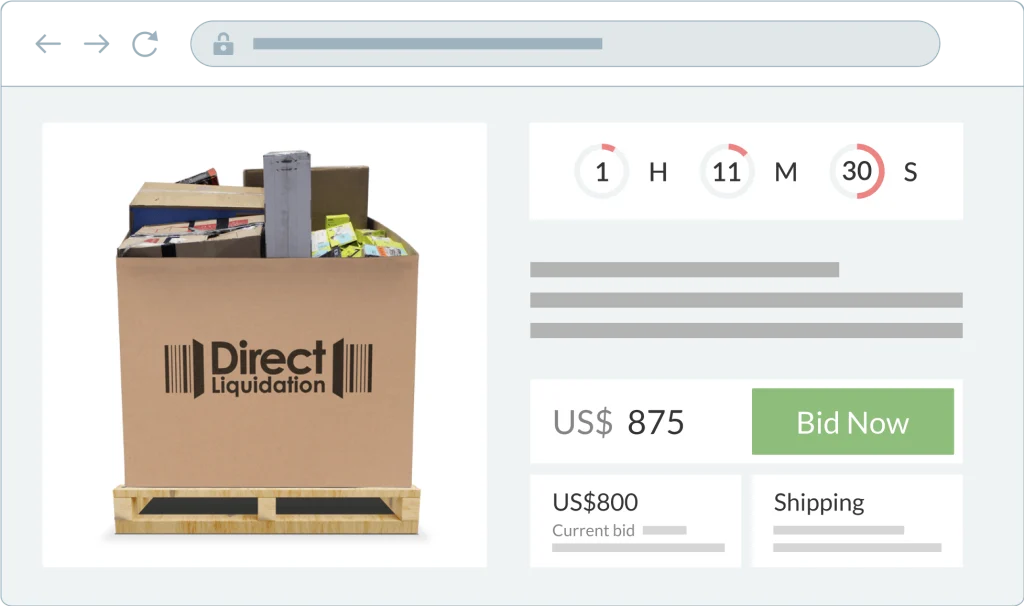
You group your stock into lots, set a starting bid, list each lot with a clear description, and let buyers bid until the timer ends. The highest bidder wins and pays, and you hand over the goods. You can do this on a third-party liquidation marketplace, which supplies the buyers and takes a fee, or on your own auction site, where you keep the buyer relationship and set your own terms. [PLACEHOLDER: add typical marketplace fee ranges only if you can source them.]
Step 1: Sort your stock into lots
Group items by category, condition, or size, such as a pallet of small appliances or a case of identical items. Count each lot, note its condition (new, open box, returned, or salvage), and photograph it.
Step 2: Set the starting bid and reserve
Choose a starting bid low enough to attract several buyers. If you want a minimum price, set a reserve. A practical way to set it is to ask a wholesale buyer what they’d pay, and use that as your floor. If the auction can’t beat that offer, you’ve lost nothing.
Step 3: Write a listing buyers can trust
Bulk buyers can’t inspect the goods first, so the listing does the work. Include an item list or manifest, quantities, condition, clear photos, where the goods are, and whether buyers collect or you ship. State that the lot is sold as described and whether returns are accepted.
Step 4: Run the auction
Set a start and end time, and give buyers a few days to look. Tell your past buyers and mailing list when it opens. Bidders register, place bids, or leave a maximum bid, and the price climbs as they compete.
Step 5: Close, confirm, and collect payment
When the timer ends, check the winning bid against your reserve. If it’s met, confirm the sale and invoice the winner. Release the goods once payment clears. If the reserve isn’t met, relist the lot or offer it to the underbidder.
Step 6: Hand over the goods
Arrange pickup or freight, record the handover, and mark the lot as sent. Ask for a review if your platform allows it, because good feedback brings more bidders next time. Relist anything that didn’t sell, perhaps in a different bundle.
What are the ways to liquidate inventory online?
There are three main routes: sell the whole lot to a wholesale buyer, list items one by one on a marketplace, or run an online auction. They differ in speed, in how much of the value you recover, and in how much work they take.
| Method | Speed | Price you get | Effort | Best for |
|---|---|---|---|---|
| Wholesale buyer | Fast, once you’ve found a buyer | Usually lowest, set by the buyer | Low after the first deal | Large lots of one product |
| Marketplace listings | Slow, because items sell one at a time | Usually highest per unit | High: photos, listings, shipping | Small quantities of good-condition items |
| Online auction | Moderate, set by your end date | Decided by bidder competition | Medium | Bulk lots and mixed stock |
Wholesale buyers take big quantities off your hands at a discount. It’s quick when you have a buyer, but finding a reliable one takes time, and you rarely get a strong price.
Marketplaces reach many shoppers and often get the best price per item. The cost is time: you list, photograph, and ship each item, and storage and shipping charges add up.
Online auctions put your stock in front of bulk buyers and let their competition set the price. They suit lots and mixed stock, and the end date gives you a clear deadline. The risk is that a lot can sell low if few people bid, so set a reserve or a sensible starting bid. [PLACEHOLDER: add one real result, e.g. a lot a customer sold and how long it took.]
If you can’t decide, ask a wholesale buyer for an offer first and use it as your reserve in an auction. You then have a floor and a chance at more.
Special Offer – Limited Time Only!
Rev Up Your Savings: Get 10% off Essential Ultimate Auction Software!
Fill the form and receive directly to your mailbox a discount code.
"*" indicates required fields
How do you liquidate Amazon inventory?
If you sell with FBA, unsold stock keeps costing you storage fees while it sits in a fulfillment center. Seller Central offers four removal options: return to you, disposal, liquidation, and donation. Which one fits depends on what the stock is still worth.
1. Review your stock
Find slow-moving and aged items. Seller Central has a Recommended Removals report that flags inventory worth removing, so start there. Rank items by how long they’ve sat and how little they earn.
2. Choose a method
- Amazon FBA Liquidations. Amazon sends your units to its contracted liquidators. It’s hands-off, but you usually recover a low share of the item’s value, and payment can take a couple of months.
- Return to you, then sell yourself. You pay a removal fee per unit, so this only makes sense if the goods are worth more than that. You can then sell them by auction, to a wholesale buyer, or on another channel.
- Third-party liquidators. Companies that buy excess stock in bulk. Get two or three quotes first.
- Your own online auction. After a removal order brings the stock back, group it into lots and let buyers bid. See how a liquidation auction works above.
3. Create the removal order
Do this in Seller Central. Select the units, choose the removal type, and confirm. Menu names change, so follow Amazon’s current help page for the exact clicks. [LINK: Amazon's removal order help page, the same one you already link to] Also check your automated removal settings. If none are set, Amazon may liquidate eligible stock for you.
4. Track the order and the payment
Follow the order in Seller Central, and review the removal fee schedule before you submit, since Amazon has changed how and when these fees are charged. [PLACEHOLDER: add "Last checked: month and year" and recheck every few months.]
Where does liquidation stock come from, and who buys it?
Liquidators and discount stores get their stock from businesses that need to clear it. Knowing the sources tells you who your buyers are and what they look for.
Store closures are one driver. Coresight Research counted 7,327 US store closures in 2024, up 57.8% from the year before, as reported by Talk Business & Politics. [UPDATE: replace with a 2025 figure if you can find one from a named source.]
The main sources are:
- Retailer overstock and returns. Retailers sell surplus and returned goods in bulk instead of storing them.
- Closing or bankrupt businesses. A business shutting down has to move its stock quickly, and liquidators buy it at a deep discount.
- Wholesale distributors. Wholesalers pass on bulk stock they’ve bought from manufacturers or big retailers.
- Manufacturer surplus. Overruns and discontinued models sometimes go straight to liquidation stores.
- Liquidation auctions and marketplaces. Sellers list overstock and returned items in lots, and buyers bid.
If you’re the seller, these are your buyers. They want lots they can count and trust, a clear condition grade, and a price well below retail, so write your listings with that in mind.
Which method should you choose?
Match the method to your stock and your deadline.
- One product, large quantity, and you need cash soon: ask wholesale buyers for offers.
- Good-condition items, small quantity, and you can wait: list them on a marketplace.
- Mixed lots or bulk stock, and you want buyers to compete: run an online auction.
- Stock sitting in Amazon’s fulfillment centers: check Amazon’s removal options first, because fees apply per unit.
Before you decide, answer three questions. How much cash do you need, and by when? What is each unit worth after storage, shipping, and any fees? How much time can you spend listing and shipping?
If you’re still unsure, get a wholesale offer first and use it as your reserve in an auction. You then have a floor and a chance at more.
How can auction software help you liquidate stock?
Software handles the parts that are slow by hand: listing lots, tracking bids, and chasing winners. For a liquidation sale, these are the features that matter. Here is what Ultimate Auction offers.
- Rules for each lot. Set the opening price, an optional reserve, the bid increment, and the start and end time.
- Proxy bidding. Buyers enter a maximum and the system bids for them, so bulk buyers who can’t watch the clock still take part.
- Buyer’s premium. Add a flat amount or a percentage on top of the winning bid, with a minimum and maximum, to help cover your costs.
- Seller submissions. If you sell on behalf of others, sellers can submit lots and you can track each from draft to sold.
- Bidder registration. Buyers sign up with an email or a social login, so you know who is bidding.
- Payment collection.
[CONFIRM: integrated payment options, and which gateways.] - Bulk listing.
[CONFIRM: whether you can upload many lots at once, and how.] - Reporting.
[CONFIRM: what reports exist for bids and auction results.]
Manage Unsold Inventory with Liqudity Services Auction platform
Use Our Excellent Auction Software can help you to use your inventory with ease.

Frequently Asked Questions
What should you do next?
Start by sorting your stock into three piles: items that still sell, items worth a bulk buyer’s attention, and items you just want gone. That split tells you which method to use.
Then get one offer before you commit. A quick quote from a wholesale buyer gives you a floor, and you can use it as the reserve if you run an auction. If you want buyers to compete for mixed lots, Ultimate Auction lets you set a reserve, increments, and a closing time for each lot. You can try it in the live demo first.


Nitesh Singh is a software veteran and the Founder of Ultimate Auction. With 16+ years of experience in web development, he specializes in building high-performance auction tools for the WordPress community. Connect with Nitesh on LinkedIn or follow his latest auction strategy guides here.
More articles by Nitesh SinghRelated Post

How to Sell Whiskey Online Like a Pro
Are you planning to sell whiskey online but don’t know where to start? Don’t worry, we are here to guide you on how to sell whiskey online and where to sell whiskey effectively. As the demand for rare and valuable whiskey bottles continues to rise in the United States, selling whiskey online has become a […]
Read More
From Passion to Profit : How Doug DeMuro Make His Money?
Introduction to cars and bids investment and doug demuro cars and bids investment Let me tell you about Doug DeMuro and how he makes all his money. One major highlight of Doug’s career is his Cars and Bids investment, which has significantly boosted his income. Doug is also a prominent figure for giving car reviews! […]
Read More
What Is A No Reserve Auction? Risk, Reward, And Results
In the world of auctions, the term “no reserve auctions” might seem a bit mysterious, but it’s actually a fascinating concept that benefits both sellers and buyers. Are you curious about the world of auctions? Wondering, “What is a No Reserve Auction?” Let’s uncover this intriguing concept that has buyers and sellers captivated. Simply put, […]
Read More