

What Is a Proxy Bid? Learn to Win Auctions Easily
 Nitesh Singh
September 3, 2023



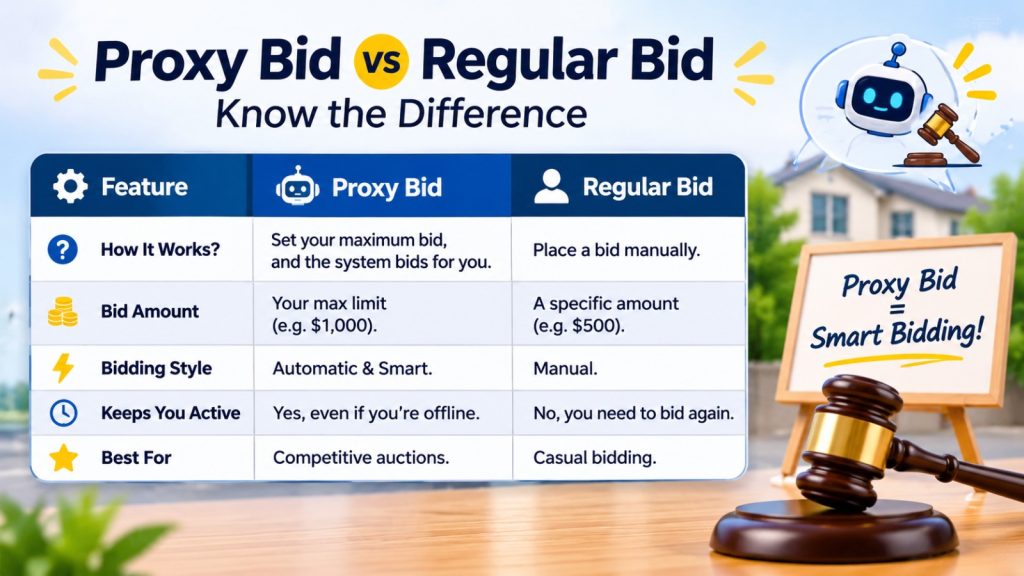
A proxy bid is a maximum amount you give an auction site so it can bid for you, one step at a time, until someone passes your limit. It lets you bid without watching the clock, and it stops you from paying more than you meant to. This guide shows how proxy bidding works with a worked example, how the winning price is calculated, and how to pick a maximum that wins more often. If you run auctions, there’s also a section on adding it to your own site.
Quick Answer: A proxy bid is an automatic bid. You enter the most you’re willing to pay, and the auction software raises your bid only as far as needed to keep you in the lead, up to that limit. Your maximum stays private. If another bidder’s limit is higher, you’re outbid. If yours is higher, you win and pay one bid increment above the next-highest limit, which is usually less than your own maximum.
Want to setup Auction Website
Ultimate Auction Software will let you do it in easy steps with Proxy Bidding.

How does proxy bidding work?
You tell the site the most you’ll pay. It bids for you in small steps, only when someone challenges you, and stops at your limit. Other bidders see the current price, never your maximum.
Here’s the sequence:
You decide what the item is worth to you and set a maximum, say $100.
You enter $100 as your automatic bid. The site doesn’t show it to anyone.
When another bidder bids, the software answers for you by raising your price by one increment.
If someone’s limit goes past yours, you get an outbid alert and can raise your maximum or walk away.
If nobody passes your limit, you win.
Carol set a limit of $120 but paid $105, which is one increment above Alice’s maximum. That’s why proxy bidding is easier on your budget than bidding by hand. If two bidders enter the same maximum, the one who entered it first usually wins. [CONFIRM: tie rule in Ultimate Auction.]
What are the benefits of proxy bidding?
- You don’t have to watch the auction. Set your maximum and go. The software answers every counter-bid for you, and it does it instantly, so a slow connection or a missed alert can’t cost you the lot.
- You stay inside your budget. You choose the limit before the bidding gets heated, and the software won’t go past it. That removes most impulse bidding.
- You usually pay less than your maximum. The winner pays one increment above the next-highest limit, as the example shows.
- Your limit stays hidden. Other bidders see the current price and nothing else, so they can’t tell how far you’re willing to go.
- You can change your mind. If you decide an item is worth more, raise your maximum.
[CONFIRM: that raising is allowed and lowering is not, in Ultimate Auction.]People in other time zones can bid on the same lot without staying up for it.
What can’t proxy bidding do?
It won’t win the auction for you. It helps you bid on your plan, but you still have to set a sensible limit.
- It doesn’t stop sniping. A last-second bidder with a higher limit still wins. Your proxy answers their bid instantly, but only up to your own maximum.
- It can’t tell you what an item is worth. Check recent sale prices before you set your maximum.
- It doesn’t include fees. Buyer’s premium, tax, and shipping come on top, so set your maximum with them in mind.
How do you set your maximum bid?
Work out what the item is worth to you in total, take off the fees, and enter that number. Then leave it alone. A maximum you set calmly, before the bidding starts, is worth more than a higher one you talk yourself into halfway through.
Five habits make the number work harder:
- Check what similar items sold for. Look at recent sold prices for the same item, not the asking prices. Your maximum should sit close to what buyers have actually paid.
- Count the fees first. Buyer’s premium, tax, and shipping all land on top of your winning bid. If an item is worth $200 to you in total and the auction adds a 10% buyer’s premium, your maximum should be about $180, because $180 plus $18 in premium is $198.
[Illustration only. Replace with the premium rates you actually use.] - Use an odd number. Many bidders type a round figure like $500. A maximum of $507 beats a $500 limit that would otherwise tie, and ties usually go to whoever bid first.
[CONFIRM: tie rule in Ultimate Auction.]You pay one increment above the other bidder’s limit, up to your own maximum, so the extra $7 costs you nothing unless it’s needed. - Write your limit down before you start. If you get outbid, ask one question before raising it: is the item worth more to me for a reason I can name? If the only reason is that you don’t want to lose, let it go.
- Decide when to place it. Some bidders enter their maximum early. Others wait until the last few minutes so rivals can’t react. Late bidding only works if you’re there at closing and the site doesn’t extend the end time after late bids, so check the listing rules first.
A reserve changes the picture. If the lot has one, your maximum may sit below it and the item still won’t sell, even if you’re the top bidder. See what a reserve means in an auction and how no-reserve auctions differ.
How do you add proxy bidding to your own auction site?
Use auction software that has proxy bidding built in, switch it on for each auction, set sensible increments, and publish the rules so bidders know how it works. Ultimate Auction is available as a WordPress auction plugin and as standalone online auction software.
1. Switch on proxy bidding for the auction
In the auction product settings, there’s an Enable Proxy Bidding option, next to the opening price, reserve price, bid increment, and Buy It Now price. Tick it, then fill in the rest.
2. Choose your increments carefully
The increment decides how fast the price climbs, and under proxy bidding it also sets the final price (one increment above the second-highest limit). Small increments suit low-priced items and big ones suit high-priced items. The settings include a variable increment option, so you can raise the step as the price grows.
3. Tell bidders how it works
Add a short note to each listing or to your rules page:
- Your maximum bid is private.
- The system bids for you only as far as needed.
- You pay one increment above the next-highest limit, not your full maximum.
- If two limits match, the earlier bid wins.
[CONFIRM.]
Bidders who understand the rules ask fewer questions and dispute fewer results.
4. Keep it honest
Proxy bidding makes automatic bids, so sellers need clear rules against bid manipulation. Don’t bid on your own items, and don’t let staff or relatives do it. Shill bidding like this is banned by most auction platforms and unlawful in many places, so check what applies where you operate. Keep a record of every bid in case a buyer questions a result.
5. Turn on alerts and test it
Outbid alerts let bidders react when someone passes their limit. Before you launch, place a proxy bid on a test lot in the live demo from a second account, so you see exactly what your bidders will see.
Payments and data protection matter too, since bidders enter card details.
What should you do next?
If you bid: pick one lot you want and work out your all-in ceiling, including the buyer’s premium, tax, and shipping. Enter that as your proxy bid and step away.
If you run auctions: open the live demo and place a proxy bid from two accounts. Watch how the price moves, and you’ll know what to put in your own rules. When you’re ready to build your own, see Ultimate Auction.
Frequently Asked Questions
Get your own Auction Today!

Choose Your Plan

Easy Setup

5 Star Support


Nitesh Singh is a software veteran and the Founder of Ultimate Auction. With 16+ years of experience in web development, he specializes in building high-performance auction tools for the WordPress community. Connect with Nitesh on LinkedIn or follow his latest auction strategy guides here.
More articles by Nitesh SinghRelated Post

Everything You Need to Know About How Nellis Auctions Work
We all want to get great deals on furniture, electronics, or even cars without leaving our home. That’s exactly what Nellis Auction makes possible. If you’re wondering how does Nellis Auction work, it’s a marketplace where people can buy and sell all kinds of items. You can browse through their listings online or even visit […]
Read More
How Do Horse Auctions Work? A Beginner’s Guide
The first time you watch horse auctions, it feels like stepping into a movie scene. The auction ring is buzzing. Hooves tap the ground. The auctioneer talks fast like they are rapping. People raise their hands in quick flashes. And in the middle of it all, a horse walks in that could be someone’s next […]
Read More
eBay Auction vs. Buy It Now: Things to Know
eBay offers two main selling formats: eBay Auction vs Buy It Now. The purpose of this article is to help sellers understand the differences between eBay Buy It Now vs Auction. It will guide them in choosing the best option for their items. In the auction format, sellers list items and buyers place bids. The […]
Read More