

How Does a Silent Auction Work? The Ultimate Fundraising Guide
 Nitesh Singh
January 9, 2024
Nitesh Singh
January 9, 2024




- How Does a Silent Auction Work?
- What Are the Best Practices for Running a Silent Auction?
- How Do You Run a Silent Auction, Step by Step?
If you’re planning a fundraiser and wondering how a silent auction works, here’s the short version: guests browse donated items, place bids on paper or on their phones, and the highest bidder wins when time runs out. This guide is for nonprofit staff, school committees, and volunteers who want to run one, in person or online. You’ll learn the step-by-step process, what a good setup looks like, and the mistakes that cost organizers money.
How Does a Silent Auction Work?
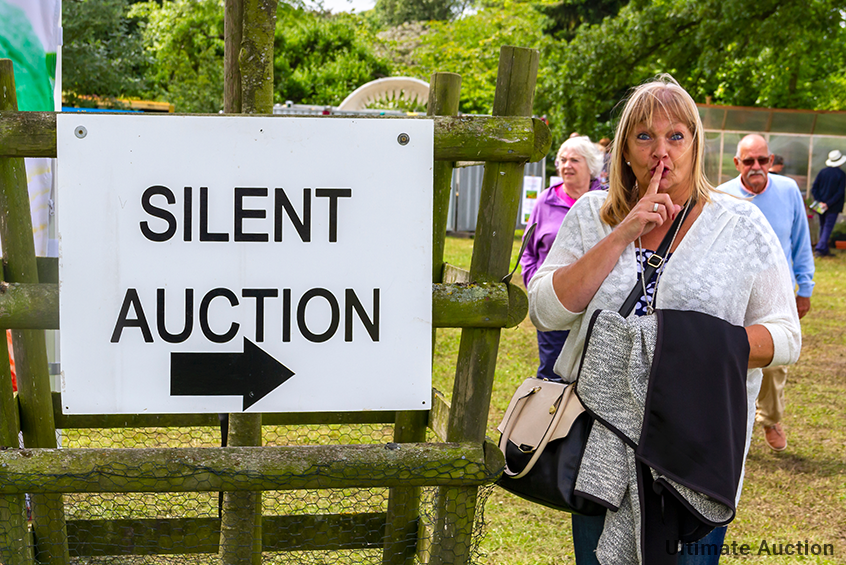
A silent auction lets guests bid on items without an auctioneer calling out prices. Each item has a bid sheet or an online listing with a starting bid, and guests can bid as many times as they like until the closing time. The highest bidder when bidding closes wins the item and pays the organizer. You can run a silent auction in person, online, or both.
Here’s how it plays out from start to finish:
- Collect items and set starting bids. Donated items usually start at 30 to 50% of fair market value.
- Display each item. In person, that means a table with a bid sheet next to each item. Online, it’s a listing page with photos, a description, and a countdown timer.
- Open bidding. Guests bid anonymously with a bidder number, on the sheet or through a mobile bidding link or QR code. Online platforms send outbid alerts so guests can come back and raise their bid.
- Close bidding. Pick a clear closing time. Announce it ahead of time, and have a volunteer or emcee call out a 15-minute warning at live events.
- Collect payment and hand off items. Winners are notified, pay by card or online checkout, and pick up their items. Online platforms handle receipts and payment tracking automatically.
What Are the Best Practices for Running a Silent Auction?
Most silent auctions that raise good money do the same few things: they promote items early, set a firm closing time, and keep the room easy to move through. Here’s what to get right.
1. Preview your best items before the event
Post photos of your top three or four items in your newsletter and on social media a week or two ahead. Guests start deciding what they want before they arrive, and online bidders can place opening bids right away.
2. Set one firm closing time
Pick a time, announce it everywhere, and stick to it. A deadline gets people to bid now instead of “later.” Check your schedule too, so dinner service or a speech doesn’t pull guests away in the last ten minutes, which is when most bidding happens.
3. Don’t overstock the room
A table crowded with items makes guests browse and leave without bidding. A common rule of thumb is no more than one item for every two guests. If you have extra donations, hold some back for your next event.
4. Keep the room easy to walk through
Leave space between tables so a few people can read a bid sheet without blocking the aisle. Put your most popular tables away from the entrance and the bar. Crowded corners make people give up on bidding.
5. Offer items at different price points
Don’t put only high-value items on display. Mix gift baskets, experiences, and big-ticket items so every guest finds something in their budget. Group items by category or price on separate tables, so guests can find what they’re after quickly.
6. Set starting bids and bid increments
Start each item at a fair price, often well below retail value, and set a clear minimum raise (for example, $5 on items under $100 and $10 above that). Clear increments stop bidding from stalling and keep guests from raising a bid by only a dollar.
Special Offer – Limited Time Only!
Rev Up Your Savings: Get 10% off Essential Ultimate Auction Software!
Fill the form and receive directly to your mailbox a discount code.
"*" indicates required fields
How Do You Run a Silent Auction, Step by Step?
Running a silent auction takes more planning than setting items on tables and waiting for bids. The steps below follow the order most organizers work in, starting with the one that affects your total the most: promotion.
Step 1: How do you promote a silent auction?
Start promoting four to six weeks before the event, and spread the work across email, social media, and your own community. Guests who know what’s on offer arrive ready to bid, and online bidders can start before the doors open.
Here’s what works for each channel:
Email. Send an invitation, then a preview of your top items one to two weeks out, then a last-call email the day before. If your list is large, send donors and past bidders different versions. Past bidders already know how it works, so tell them what’s new this year.
Social media. Post photos of individual items on Facebook, Instagram, and X, one or two a day in the final week. Add a countdown post (“3 days left to bid”) with a link to the auction page. Clear, well-lit photos get more attention than stock images.
Sneak peeks. Share your three or four biggest items early with a photo, a short description, and the starting bid. A 15-second phone video of an experience item (a tour, a class, a weekend stay) tends to draw more interest than text alone.
Your own community. Ask donors, sponsors, and board members to share the auction link with their contacts. A message from a person guests know gets more clicks than a post from the organization. For in-person events, add a QR code to flyers and posters so people can register to bid from their phones.
2. How do you choose a venue for a silent auction?
Pick a room with space for guests to browse without lining up at tables, easy access for everyone, and a spot for food and drinks away from the bidding. If your auction is fully online, skip to Step 3.
Space. Guests need to walk, stop, and read a bid sheet without blocking others. A room that feels slightly too big works better than one that feels full.
Display area. Check how many tables the venue provides and where they can go. Line some along the walls and place a few in the middle so people can circle them.
Accessibility. Look for step-free entry, wide aisles for wheelchairs, tables at a height everyone can reach, and enough parking or a nearby bus or train stop.
Food and drink. Place the bar and food away from the auction tables. Guests who stop to chat next to a bid sheet block the people trying to bid.
Wi-Fi and power. If guests will bid from their phones, test the signal in the room before the event. Weak Wi-Fi in the corner where your best items sit costs you bids.
3. How do you choose the right auction items?
Choose items based on who is coming, not on what’s easiest to collect. A school parent night, a hospital gala, and a church dinner will bid on very different things.
Know your audience. Look at who attended past events. Are they young families, retirees, local business owners? Ask your committee what those groups spend money on, and look at which items sold fastest last time.
Offer a mix. Include a few big-ticket items (a getaway, a piece of art, electronics), a handful of mid-range baskets, and several smaller items so every guest has something in their budget. Wine baskets, restaurant gift cards, spa days, and tickets to local events are reliable sellers.
Choose items people can’t buy in a store. A cooking class with a local chef, a parking spot at the school for a month, or a signed item from someone in your community will draw more interest than a generic gift card. Guests bid higher on things they can’t just order online.
4. How do you display auction items?
Give every item its own space, good light, and a sign next to it. Guests decide in a few seconds whether to stop, so the display has to make that easy.
Use different heights. Put items on risers, boxes covered with a tablecloth, or stacked crates so the back row stays visible. Keep the tallest items at the back.
Light the tables. A dim corner loses bids. Check the lighting with the room set up, and add clip lights or lamps on the darker tables.
Group items. Put related items together (food and wine, kids’ items, experiences) so guests can find what they want. Add simple props like a basket, a ribbon, or a plant to make a gift basket look finished.
Add a sign and a bid sheet to each item. Use an easel or stand with the description, and attach a pen to the bid sheet so guests don’t have to hunt for one. This stops guests from asking volunteers the same questions all evening.
For online auctions, photograph each item in natural light against a plain background, and add two or three angles. A clear photo does the job of the display table.
5. What should an item description include?
A good description tells bidders what they’re getting, what it’s worth, and why their bid matters. Keep it short enough to read in about ten seconds.
Include:
Where the money goes. One line on what the funds support, such as “Every $50 raised buys a week of school supplies for a class.
Get your Car Auction Website Instantly
Sell your car from your own website and earn Buyer’s Premium on it

6. Registration
Although registration is not always required for silent auctions, there are several benefits for both participants and organisers:
Anonymity:
Participants can maintain their anonymity throughout the bidding process by registering. A bidder number is given to each registered participant; they can use this number instead of their names.
Contact Information:
Registration gives organisers access to vital contact details. This can be helpful for post-event communications, such as providing details on successful bids and upcoming events.
Orderly Process:
The bidding process is streamlined and kept organised using bidder numbers. It also lessens the likelihood of misunderstandings or conflicts.
7. Bid Sheets
In a silent auction, the bidding sheets are the hub of activity. They are the primary means by which participants can bid on goods they want. When creating and utilizing bid sheets, keep the following in mind:
Clear Instructions:
Give precise directions on how to fill out the bidding form. Specify the location for writing the bid amount and bidder number. If your product has a “Buy Now” option, explain how to use it.
Buy Now Price:
If there is a “Buy Now” price for an item in your auction, ensure the bidding sheets make it obvious. This eliminates the need for attendees to wait to place a bid and enables them to make an instant purchase.
Volunteer Assistance:
Ensure volunteers are on hand to aid attendees with the bidding sheets or any questions. They can offer advice to participants on proper bid placement.
Organised Placement:
Ensure the bid sheets are arranged so guests can easily find and access them. Group them by item or category for a more organised display.
What Is Silent Auction Software, and Do You Need It?
Silent auction software lets guests browse items, place bids, and pay online instead of on paper bid sheets. You don’t need it for a small in-person event, but it saves a lot of work once you have more than a few dozen items or guests who can’t attend in person.
Here’s what it handles for you:
- Bidding. Guests bid from their phones, and the software tracks the highest bid and sends outbid alerts.
- Hidden bids. In a silent auction, other bidders shouldn’t see the current price. The software hides it for you.
- Closing. Every item closes at the set time, so you don’t need volunteers collecting bid sheets.
- Payment and records. Winners pay online, and you get one list of what sold and who owes what.
What does it look like in practice?
Here’s how silent bidding works in Ultimate Auction Pro Theme.
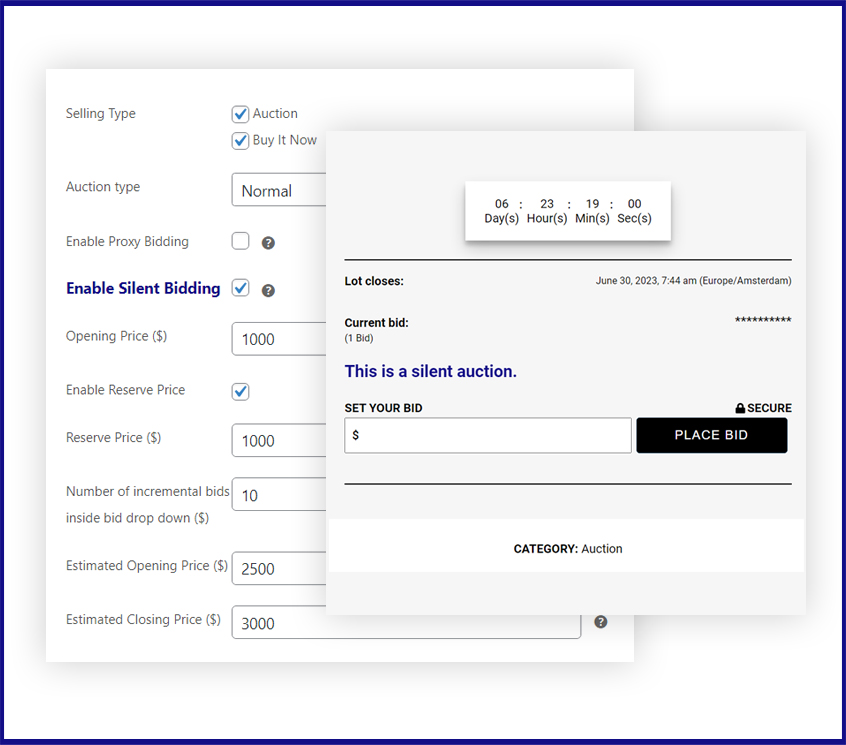
On the left is the admin screen. You tick Enable Silent Bidding, then set the opening price, reserve price, and bid increments. On the right is what bidders see: a countdown timer, the closing time, a hidden current bid, and a Place Bid button.
What to look for when choosing software
- Hidden bids, so it works as a true silent auction
- A reserve price and bid increments you can set per item
- Mobile-friendly bidding, so guests don’t need to install an app
- Secure online payment and receipts
- Outbid alerts by email or text
- Support if something breaks during the event
What Should You Do Next?
Before your next silent auction, pick your closing time and your top five items, then work backward to build your promotion schedule. Those two decisions shape everything else.
If you’d rather run it online, you can see how the silent bidding settings work in Ultimate Auction Pro Theme.
Get your Car Auction Website Instantly
Sell your car from your own website and earn Buyer’s Premium on it
Get your own Auction Today!

Choose Your Plan

Easy Setup

5 Star Support


Nitesh Singh is a software veteran and the Founder of Ultimate Auction. With 16+ years of experience in web development, he specializes in building high-performance auction tools for the WordPress community. Connect with Nitesh on LinkedIn or follow his latest auction strategy guides here.
More articles by Nitesh SinghRelated Post

Silent Auctions for Art Galleries: Proven Tips to Stand Out
A silent auction for an art gallery lets visitors bid on artwork by writing offers on a sheet beside each piece, or by placing bids online. There’s no auctioneer and no paddles. When the clock runs out, the highest bid wins. If you run a gallery, or you’re planning a fundraiser inside one, this guide […]
Read More
what is a silent auction and how does it work?
Welcome to the exciting world of silent auctions! If you’re wondering what is a silent auction, it’s a fundraising event or sales format where bids are placed privately rather than openly. Whether you’re a nonprofit organization raising funds for a charitable cause or an entrepreneur looking to create a unique online marketplace, hosting a silent […]
Read More