

Archives: Downloads
Objective
To integrate and configure the HivePress Membership plugin with our auction theme in order to provide buyer membership and bidding credit functionality with minimal custom development.
This approach leverages HivePress’s core membership features while ensuring compatibility with our theme’s existing Seller Dashboard and auction flow.
Scope of Work
1. Plugin Configuration & Integration
- Install and configure the HivePress Membership plugin.
- Align plugin functionality with our auction theme.
- Customize and disable overlapping features to ensure a smooth, unified workflow.
2. Feature Alignment & Adjustments
Since the Auction Theme already includes seller functionality, the following HivePress modules will be disabled or modified:
- Seller Dashboard
- Listing submission and approval workflow
- Listing management (status, drafts, approvals)
3. Offline Dealing Module
- Set up a basic offline transaction module for product-related deals handled outside the online payment system.
- Ensure clear status tracking between seller, buyer, and admin.
4. WooCommerce & Payment Integration
- Connect HivePress membership packages with WooCommerce products to enable package purchases.
- Configure Razorpay for secure online payments.
- Automatically update buyer bid credits after successful purchase.
5. Testing & Workflow Verification
Full end-to-end testing to ensure:
- Seller lists product → Admin approves listing
- Buyer purchases membership → Credits added automatically
- Buyer places bids → Auction closes → Non-winners’ credits released
Deliverables
- HivePress Membership plugin setup and configuration
- WooCommerce + Razorpay integration
- Bid credit sync with purchased membership
- Seller dashboard and listing approval flow validation
- Complete workflow testing and delivery
Effort
- Total Development Effort = 15 hours
Commercials
- Standard Rate: USD 45 / hour
- Total Cost (Before Discount): 15 hours × USD 45 = USD 675
Special Offer
We’re offering a 30% compatibility discount since this integration involves adapting an external plugin (HivePress) to work seamlessly with our auction theme.
- Discount (30%): USD 202
- Final Project Cost: USD 472
Objective
To develop a custom buyer membership and bidding credit system that seamlessly integrates with your existing auction theme.
This system will allow buyers to purchase bidding packages, manage their credits, and participate in auctions efficiently — while giving the admin full control over package management, credit tracking, and payment processing.
The goal is to create a stable, scalable, and future-proof solution that removes dependency on third-party plugins like HivePress and provides a smooth user experience for both buyers and administrators.
Scope of Work
1. System Architecture & Setup
- Design the database structure for storing user bid credits, package details, and transaction history.
- Integrate the new system seamlessly with the existing auction and WooCommerce setup.
- Add a global settings panel under the admin menu for enabling/disabling the system and managing global options like credit expiry duration.
2. Admin Dashboard
- Create a dedicated “Bid Credits” admin page to:
- View all users’ available and used credits.
- Track package purchase and usage history.
- Manually add, deduct, or reset user credits.
- Provide filters and search options for easy management.
- Add capability to export credit reports if required (optional future extension).
3. Package Creation & Management
- Build a custom Gutenberg block for adding and displaying bidding packages.
- Fields include: Title, Description, Icon/Image, Price, Credit Value, Linked WooCommerce Product.
- Allow easy placement of packages on any page using Gutenberg.
- Ensure packages are fully manageable without code — from the WordPress admin.
4. Frontend Buyer Page
- Create a dedicated Buyer Packages Page where users can view and purchase available packages.
- Ensure design consistency with your current theme or reference layout.
- Show package details, available credits, and purchase button (linked to WooCommerce checkout).
5. Payment Gateway Integration
- Implement Razorpay for secure online payment processing for Buyer Package Purchasing.
- Test and validate the complete checkout flow with both live and test modes.
- Automatically credit the user’s account after successful payment confirmation.
6. Email Notifications
- Send confirmation emails to both the buyer and admin after successful package purchase.
- Include transaction details, purchased credits, and current balance in the email body.
7. Bidding Logic Integration
- Modify the bidding system to:
- Deduct bid credits when a user places a bid.
- Prevent bidding if insufficient credits are available.
- Automatically release unused credits back to non-winning bidders when the auction ends.
- Ensure full compatibility with existing auction logic and cron-based auction closure processes.
8. Testing & Deployment
- Conduct full end-to-end testing including:
- Package purchase flow
- Credit addition and deduction
- Auction bid placement
- Credit refund/release
- Email and payment confirmations
- Deploy to the live site after final verification and client approval.
Deliverables
- Fully custom buyer membership and credit system
- Razorpay integration with checkout flow
- Admin credit management dashboard
- Automated email notification system
- End-to-end workflow testing and production-ready deployment
Effort
- Total Development Effort = 30 hours
Commercials
- Standard Rate: USD 45 / hour
- Total Cost (Before Discount): 30 hours × USD 45 = USD 1,350
Special Offer
Since this system will be fully integrated with our own auction theme, we are offering a special 50% contribution discount as part of our continued collaboration and long-term partnership.
- Discount (50%): USD 675
- Final Project Cost: USD 675
Objective
To clean up and optimize the website’s structure, layout, and performance, with a focus on enhancing user experience, code maintainability, and site speed. The key focus is on improving the “My Account” section to make it intuitive, user-friendly, and fully functional.
Scope of Work
1. My Account Page Navigation Updates
Tasks:
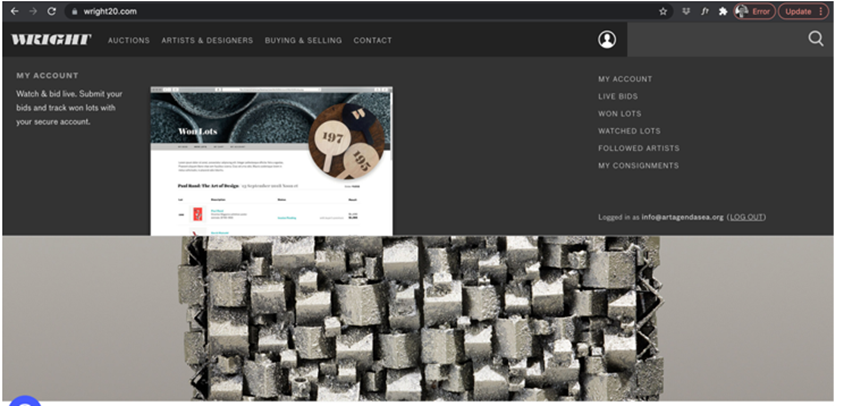
- Add a dropdown menu under the user icon with the following options:
- My Account
- Favorites and Live Bid
- Purchase and Past Bid
- Ensure menu matches the style and behavior as per reference attachment.
2. My Account Page Layout Update
Tasks:
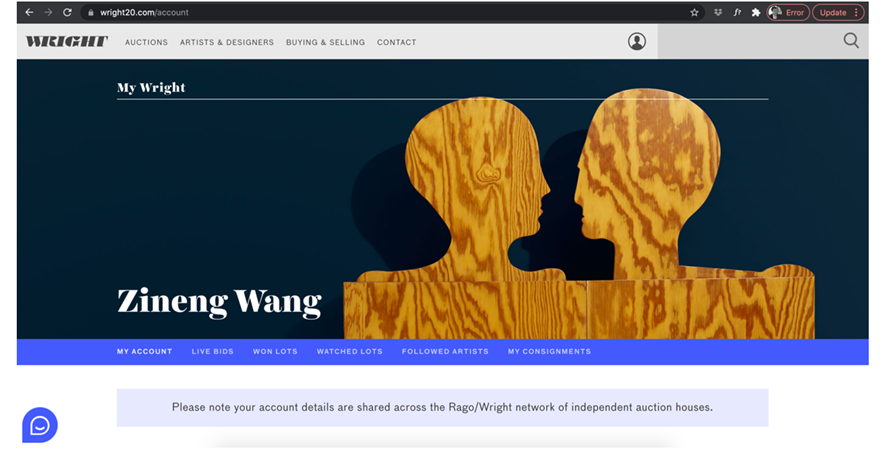
- Redesign the “My Account” page layout.
- Implement a horizontal tab menu for better navigation between sections.
- Arrange all menu items following the reference website: Wright20.com.
- Same as attached
3. Personal Details Consolidation
Tasks:
- Merge all personal details into a single page for ease of management.
- Sections to include:
- Account Information
- Address
- Password Change
- Profile Edit
4. SMS Preferences & Notifications
Tasks:
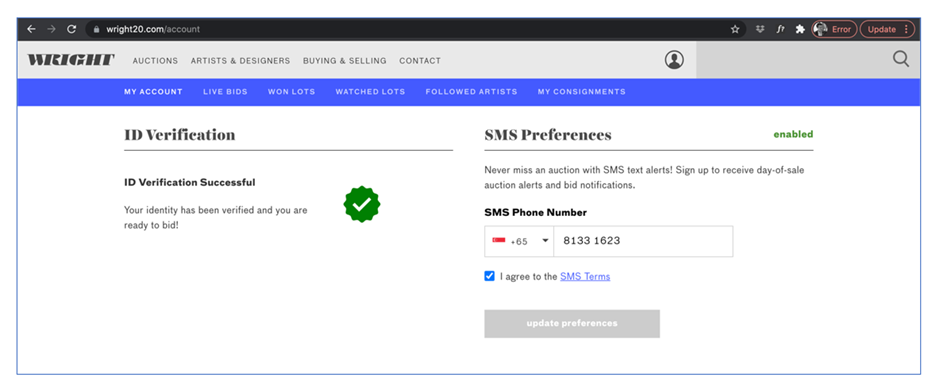
- Implement SMS feature for user notifications.
- Users can enable/disable notifications for:
- Bid placed
- Outbid notifications
- Won auction notifications
- Notifications for new sales
5. Bid History & Favorites
Tasks:
- Display detailed bid history including:
- Won auction details
- Past bidding history
- Favorites Section:
- Display auctions added to Favorites
- Automatically add items to Favorites when a bid is placed
- Layout and behavior should mirror the reference website.
Design and Development
Tasks:
- Figma Layout Design : Create Figma designs for the updated My Account page and related sections:
- Navigation dropdown under the user icon.
- Horizontal tab layout for account sections.
- Combined Personal Details page.
- SMS Preferences toggle interface.
- Bid History and Favorites layout.
Effort = 2 hours
Development Phase
Tasks:
- Frontend Development
- Integrate the new “My Account” layout using custom templates.
- Implement horizontal tab navigation.
- Style components as per approved Figma designs.
- Ensure responsive and cross-browser compatibility.
Effort = 5 hours
- Backend Development
- Create/manage account-related endpoints for fetching and updating user data.
- Implement SMS Preference logic (using Twilio or similar API).
- Update logic for Favorites and Bid History sections to display dynamic data.
- Add automatic favorites when users place bids.
Effort = 15 hours
- Testing & Optimization
- Functional testing for all “My Account” features.
- Validate SMS notifications workflow (if Twilio subscription is available).
- Optimize code for performance and maintainability.
Effort
- Total Development Effort = 22 hours
Commercials
- Total Cost
22 hours x USD 45/hour = 990 USD